🧭 Section 1: Where to Start (Project Setup)
📝 Summary (What you will do)
In this section, you will create the foundation of your project by setting up:
- The project header comment (docstring)
- The imports your program will need
- Game “tuning” constants (settings)
- A small helper function called
clamp()that keeps numbers in a safe range
This section doesn’t run the full game yet—it sets up the tools the rest of the program will use.
✅ Checklist (You must complete these)
- Create a file named
pet_manager.py - Type the project header comment (docstring) at the top of the file
- Add all required imports
- Add the tuning constants at the top of the file (not in the middle later)
- Write the
clamp()helper function exactly as shown - Add the “future code” comment so you know where the rest will go
🎓 Core Concepts (New learning for this section)
1) Why do we start with imports?
Imports let us use tools from Python libraries:
randomlets us create random starting stats later (like hunger/happiness).syslets us safely quit the program later.typinghelps us write clearer code with type hints (we’ll use these a lot).abcgives us abstract classes, which help enforce that child classes follow rules.
You won’t use all of these immediately, but they are part of building a real program:
we set up what we need early, so we don’t scatter imports everywhere later.
2) What are constants and why are they at the top?
Constants are values that act like settings for your program.
For example:
- How fast hunger goes up (
TICK_DECAY) - How much XP a pet gets (
ACTION_XP) - The max and min allowed stats (
MAX_STAT,MIN_STAT)
By putting constants at the top, we can “tune” (adjust) the game without digging through the code.
✅ Important rule for this project:
Any new constants or “settings” should always be placed at the top of the file, not in the middle.
3) What does clamp() do?
Later, stats like hunger or happiness will change a lot.
Example problem:
If happiness goes above 100, or below 0, the numbers stop making sense.
That’s why we use clamp() — it forces numbers to stay in a safe range.
Example:
clamp(120)becomes100clamp(-5)becomes0clamp(45)stays45
This is a common helper function used in games and simulations.
💻 Code to Write (Type this by hand in pet_manager.py)
Directions:
- Open your code editor.
- Create a file named:
pet_manager.py - Type this code exactly at the top of the file.
- Type it by hand—don’t copy/paste—so you learn the structure.
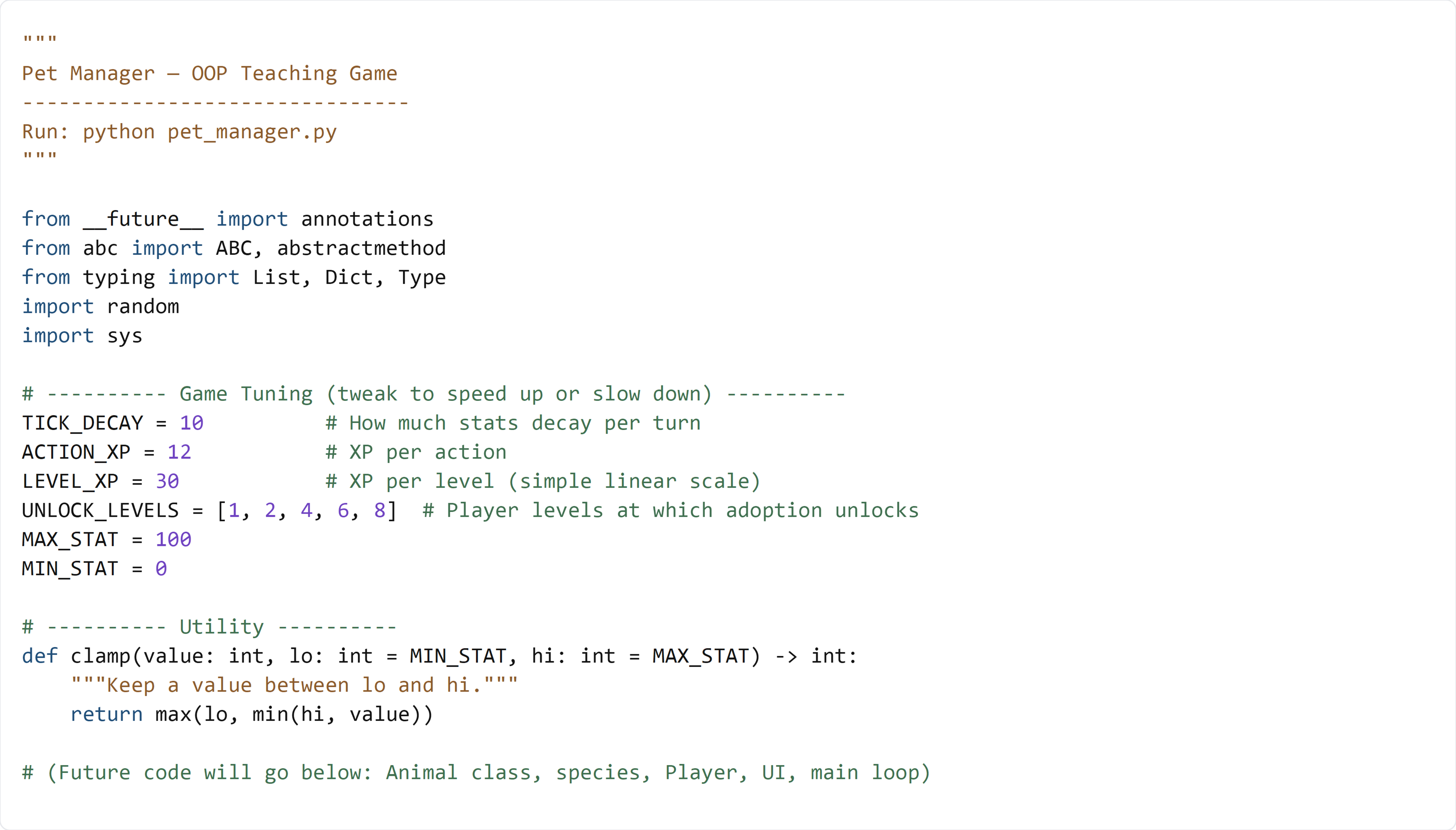
🧠 Code Review & Key Concepts (What important lines do)
Project Docstring
"""
Pet Manager — OOP Teaching Game
--------------------------------
Run: python pet_manager.py
"""
- This is a docstring.
- It describes what the program is and how to run it.
- It’s useful for you and anyone reading your code later.
Imports
from __future__ import annotations
*
This helps Python handle type hints (like List[Animal]) more smoothly.
* You don’t need to master this today—just know it helps with typing.
from abc import ABC, abstractmethod
ABCstands for Abstract Base Classabstractmethodforces subclasses to implement certain methods
(Example: every animal will be required to have a “special action” later)
from typing import List, Dict, Type
*
These help us label our variables clearly.
* Example later: animals: List[Animal] means “a list of Animal objects.”
Constants (Settings)
TICK_DECAY = 10
ACTION_XP = 12
...
- These are our game settings.
- We can change the feel of the game by changing these numbers.
The clamp() helper function
return max(lo, min(hi, value))
This line is doing two things:
min(hi, value)makes sure the value is not too high.max(lo, ...)makes sure the value is not too low.
So the result is always between lo and hi.
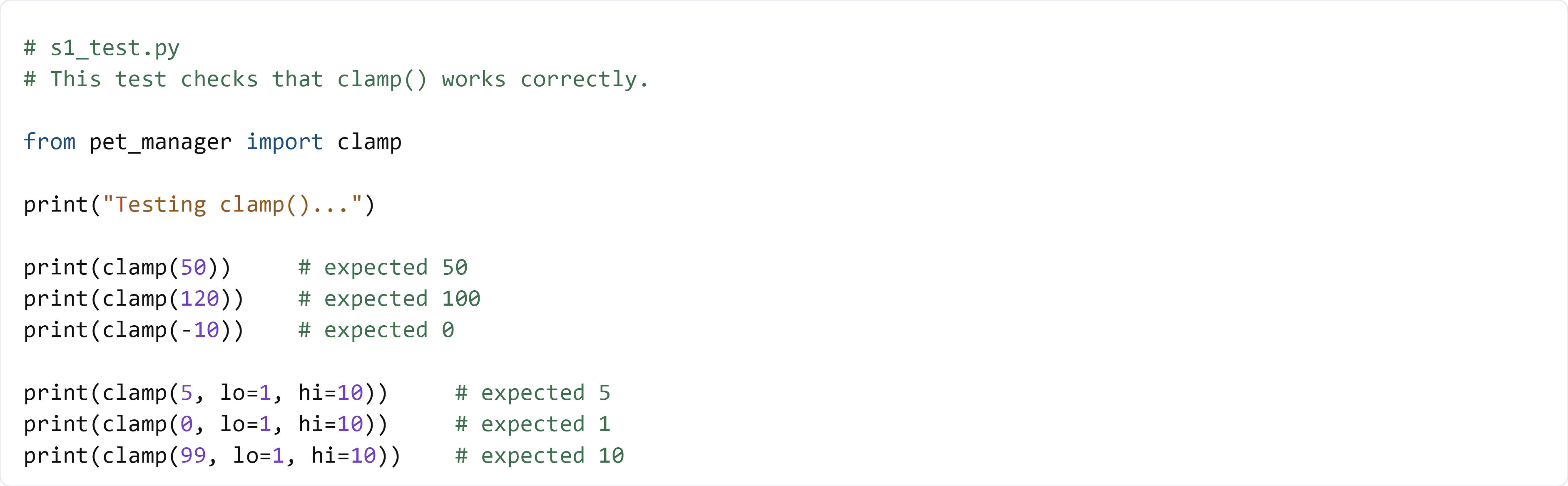
🧪 Test File: s1_test.py
✅ Create this file
Make a new file in the same folder as pet_manager.py called:
s1_test.py
💻 Code to write in s1_test.py
🧠 What this test is doing (and how it works)
- This file imports only the
clamp()function frompet_manager.py - It prints out results so you can confirm they match expectations
- The first few tests use the default min/max (0 to 100)
- The last few tests use custom limits (1 to 10)
✅ Run the test like this:
python s1_test.py
If your output matches the “expected” comments, you completed Section 1 correctly.