🧱 Section 2: Create the Base Class Shell (Animal)
📝 Summary (What you will do)
In this section, you will create the Animal base class. This class will be the “blueprint” for all animals in the game (Dog, Cat, Bird, etc.).
Right now, this class won’t do everything yet. It’s a shell (starter structure) that:
- Stores animal data (name, hunger, happiness, cleanliness, level, XP)
- Uses an abstract method to require that every animal type has a
special_action()later
This section is the first big step into Object-Oriented Programming.
✅ Checklist (You must complete these)
- Find the comment in
pet_manager.pythat says where future code will go - Add the
Animalclass below Section 1 - Make sure
Animalinherits fromABC - Write the
__init__method with the correct instance variables - Add the
@abstractmethodspecial_action()method exactly as shown - Keep the “future code” comment at the bottom of the section
✅ No new constants/settings are added in this section, so you do not need to edit the top-of-file constants.
🎓 Core Concepts (New learning for this section)
1) What is a “base class”?
A base class is a general class that other classes will build from.
Example:
Animalis the base class (general rules for all animals)- Later we’ll create classes like
Dog(Animal)andCat(Animal) - Those are subclasses (more specific versions)
Why do this?
- You avoid repeating the same code in every animal type.
- You build shared features once, then reuse them.
2) What is an abstract class (ABC)?
An abstract class is a special kind of base class that is not meant to be used directly.
In this project:
- We do NOT want someone creating a plain
Animal()in the game. - We want them to create a
Dog(),Cat(),Bird(), etc.
So we make Animal an abstract base class using:
ABC@abstractmethod
3) What does @abstractmethod do?
@abstractmethod forces subclasses to include a required method.
That means:
- If you create
class Dog(Animal): - Dog MUST define a
special_action()method
If you forget, Python will not let you create a Dog object.
This is helpful because it keeps your program organized and consistent.
4) Encapsulation and _private-ish variables
You’ll notice variables like:
self._hungerself._happiness
The underscore _ is a Python convention that means:
“This should be treated like private data. Don’t change it directly from outside the class.”
Later, we’ll use properties to safely access these values.
5) Why random starting stats?
We use random.randint() so each animal begins slightly differently.
That makes the program more interesting and more “real” without adding complexity.
💻 Code to Write (Type this by hand in pet_manager.py)
Directions:
- Open
pet_manager.py - Find the line near the bottom that says:
# (Future code will go below: Animal class, species, Player, UI, main loop) - Below Section 1, type the following code by hand:
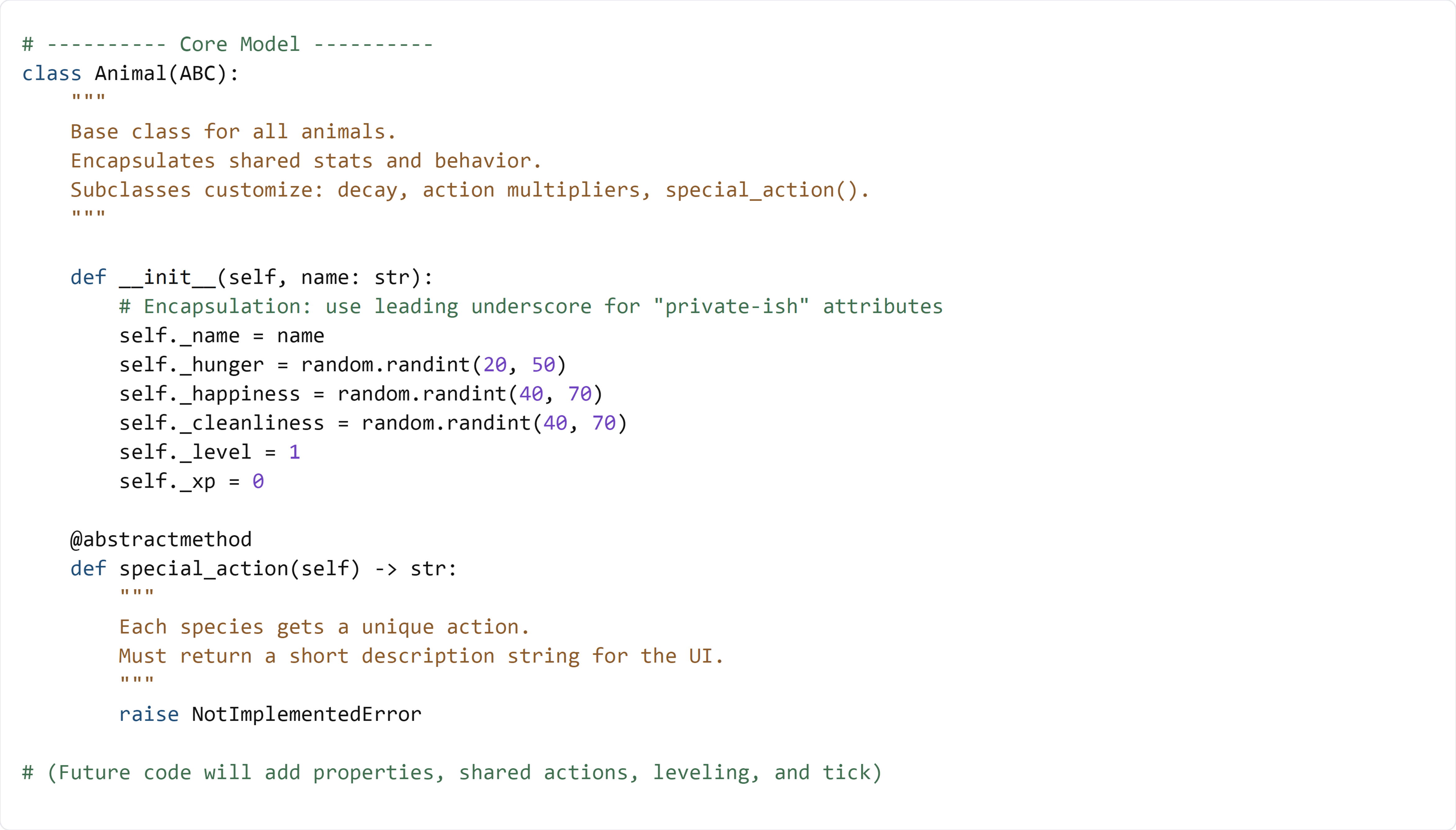
🧠 Code Review & Key Concepts (What important lines do)
Inheritance from ABC
class Animal(ABC):
This means:
Animalis an abstract base class- You’re creating a general “Animal” blueprint
- You are not meant to create plain
Animal()directly later
Constructor (__init__)
def __init__(self, name: str):
This runs automatically when an animal is created.
Example (later):
dog = Dog("Buddy")
This will call the Animal constructor first, setting up the stats.
Instance variables
self._hunger = random.randint(20, 50)
These are instance variables, meaning each animal object gets its own copy.
So one Dog might start with hunger 25, another might start with hunger 45.
Abstract method
@abstractmethod
def special_action(self) -> str:
This forces every subclass (Dog/Cat/Bird) to create its own version of:
special_action()
The raise NotImplementedError is a safety reminder:
“If this gets called, something is wrong—because subclasses should replace it.”
🧪 Test File: s2_test.py
✅ Create this file
Create a new file in the same folder called:
s2_test.py
💻 Code to write in s2_test.py
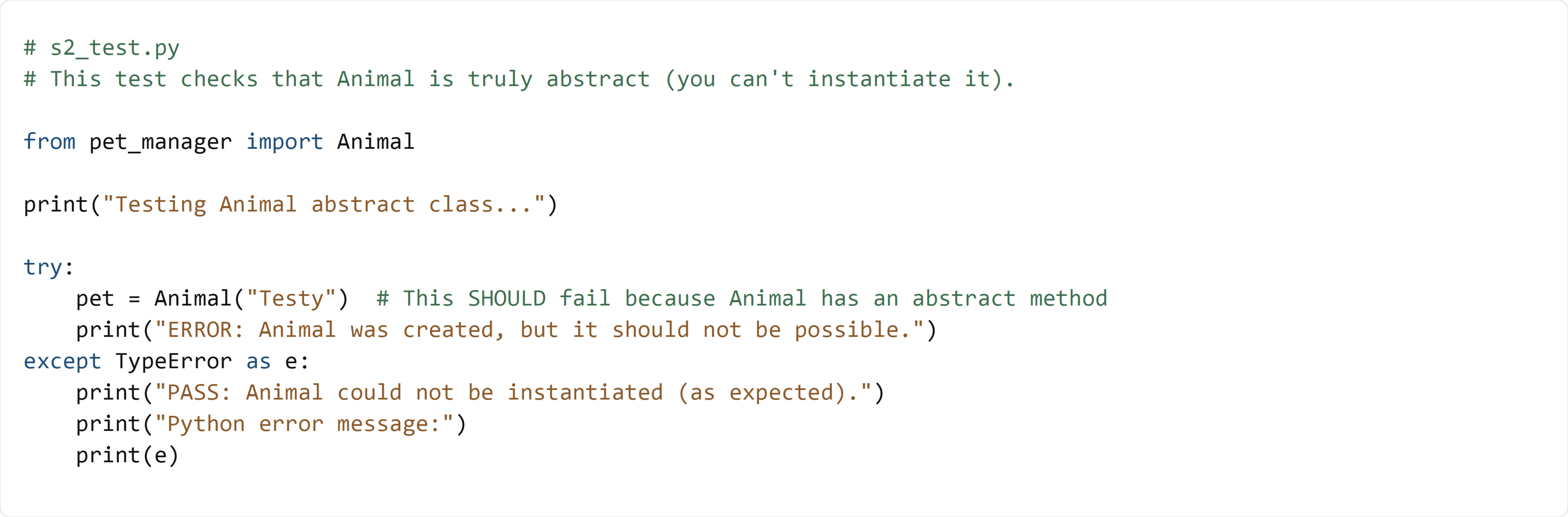
🧠 What this test is doing (and how it works)
- It tries to create an
Animal("Testy") - Because
Animalcontains an@abstractmethod, Python should block this - When Python blocks it, it raises a
TypeError - The test catches that error and prints PASS
✅ Run the test:
python s2_test.py
If you see PASS, your base class shell is correctly set up and ready for the next section.