🔍 Section 3: Add Properties + "Is Struggling?"
📝 Summary (What you will do)
In this section, you will make your Animal class easier (and safer) to use by adding:
- Read-only properties so other parts of the program can access animal stats like
pet.nameandpet.hunger - A quick helper method called
is_struggling()that checks if an animal's stats are getting too low (or hunger too high)
This is a key OOP idea: encapsulation. We keep the real data "protected" (the _name, _hunger, etc.), but we still allow safe access.
✅ Checklist (You must complete these)
- Open
pet_manager.py - Find
class Animaland locate the__init__method - Add the
@propertygetters directly after__init__ - Add the
is_struggling()method (right after the properties) - Do not remove your existing
@abstractmethod special_action()method
✅ No new constants/settings are added in this section, so you do not need to edit the top-of-file constants.
🎓 Core Concepts (New learning for this section)
1) What is a property?
A property lets you access a method like it's a normal variable.
Without properties (what we have right now), you might be tempted to do:
print(pet._hunger)
But _hunger is meant to be "private-ish." We want to protect it.
With a property, you can do:
print(pet.hunger)
That is cleaner and safer.
2) Why "read-only" is useful
In this project, we want other code (like the UI/dashboard) to be able to see stats, but not directly change them.
Read-only properties help because:
- You prevent accidental changes like
pet.hunger = 0from outside the class - You keep all stat changes inside methods like
feed(),play(),clean(), andtick()
Later, if we ever change how hunger is stored, the rest of the program can still use pet.hunger without breaking.
3) Boolean logic (or) in is_struggling()
is_struggling() returns a boolean:
Truemeans: "This pet needs attention!"Falsemeans: "This pet is doing okay."
We use or because struggling is true if ANY ONE of these is true:
- hunger is too high (
> 80) - happiness is too low (
< 20) - cleanliness is too low (
< 20)
💻 Code to Write (Type this by hand in pet_manager.py)
Directions:
- Open
pet_manager.py - Find
class Animal - Inside
class Animal, locate the__init__method - Right after
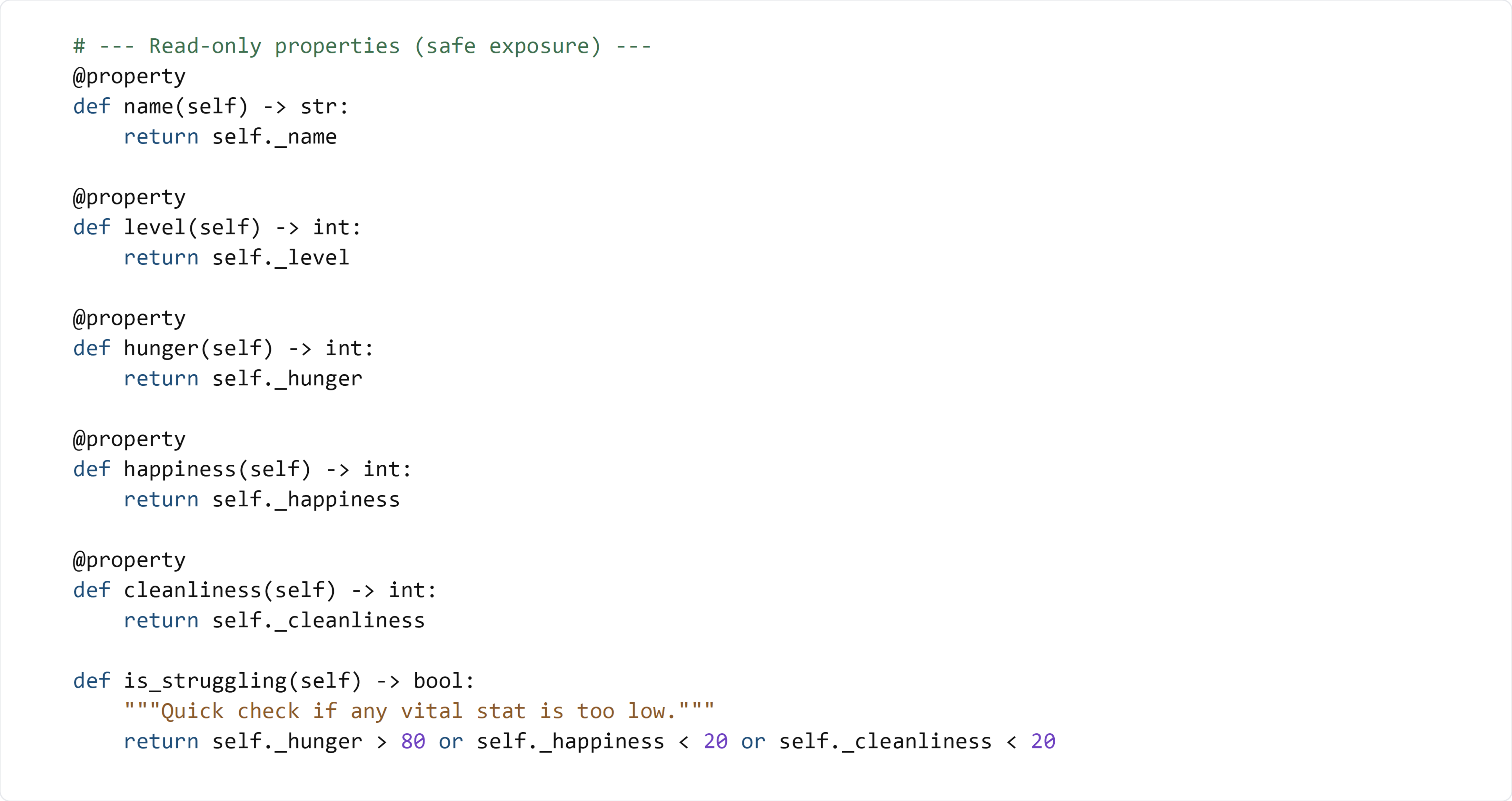
__init__, type the following code by hand:
🧠 Code Review & Key Concepts (What important lines do)
The @property decorator
@property
def hunger(self) -> int:
    return self._hunger
This creates a read-only property called hunger.
That means:
- You can do:
pet.hunger - You do not call it like a method:
pet.hunger()
It reads your internal variable _hunger and returns it.
Read-only behavior
Because we did not write a setter, this should fail:
pet.hunger = 0
Python will raise an AttributeError because hunger is read-only.
is_struggling()
return self._hunger > 80 or self._happiness < 20 or self._cleanliness < 20
This is one line of boolean logic:
self._hunger > 80checks if hunger is dangerously highself._happiness < 20checks if happiness is dangerously lowself._cleanliness < 20checks if cleanliness is dangerously low
Using or means:
- If any condition is true, the whole result becomes
True
Later, the dashboard can use this to show a warning that a pet needs attention.
🧪 Test File: s3_test.py
✅ Create this file
Create a new file in the same folder called:
s3_test.py
💻 Code to write in s3_test.py
🧠 What this test is doing (and how it works)
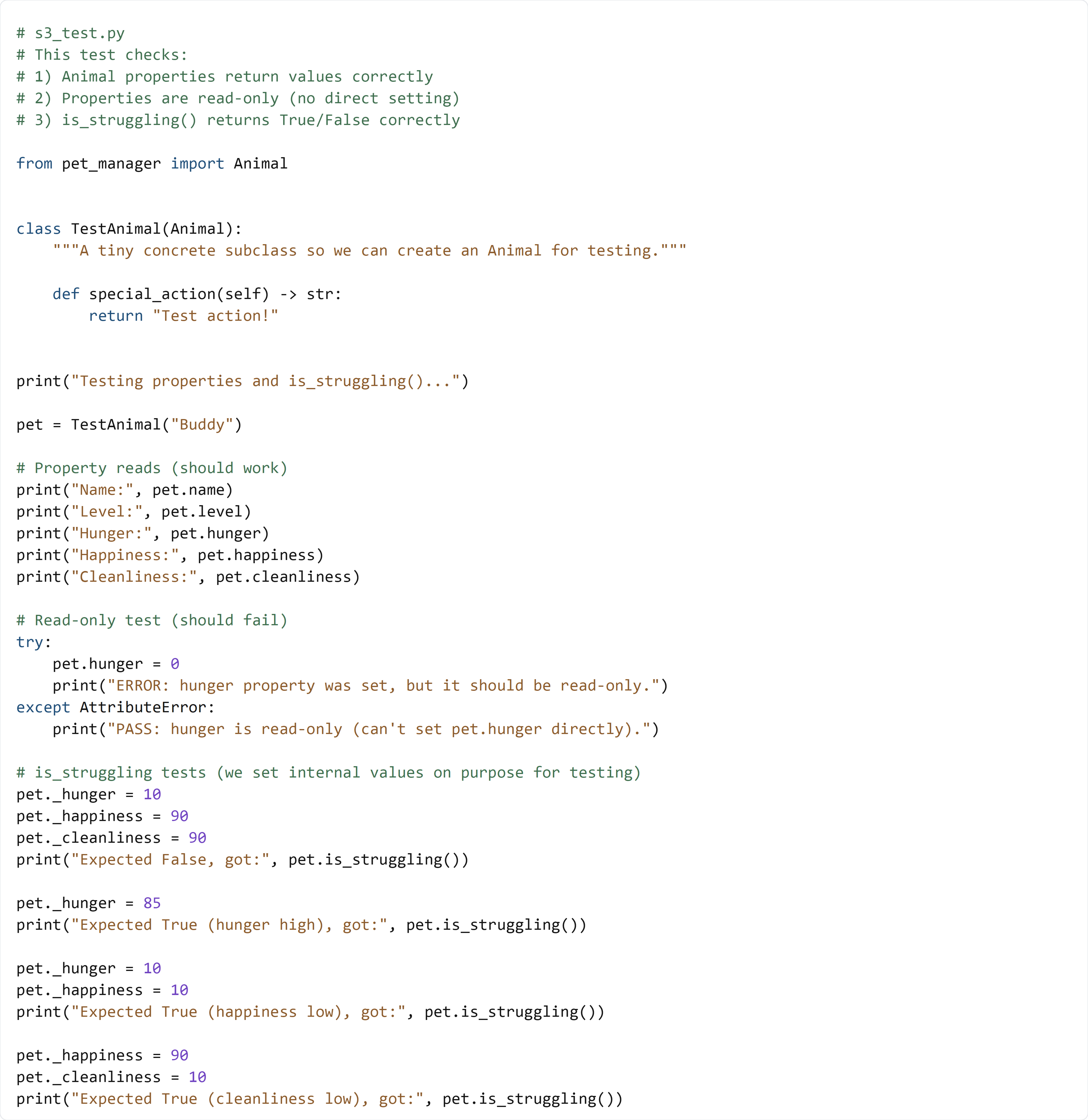
Animalis abstract, so the test creates a tiny subclassTestAnimalthat implementsspecial_action()- It prints out the property values to confirm the getters work
- It tries
pet.hunger = 0to prove the property is read-only (it should raiseAttributeError) - It manually sets
_hunger,_happiness, and_cleanlinessso we can test theis_struggling()logic on purpose
✅ Run the test:
python s3_test.py
If your output matches the "Expected ..." comments, you completed Section 3 correctly.