🍗 Section 4: Add Shared Actions (Feed / Play / Clean)
📝 Summary (What you will do)
In this section, you will add the first real gameplay actions to your Animal class:
feed()(hunger goes down, happiness goes up a little)play()(happiness goes up, but hunger goes up too)clean()(cleanliness goes up, happiness goes up a little)
Each method will:
- Change the animal's internal stats (
self._hunger,self._happiness,self._cleanliness) - Use
clamp()so stats never go below 0 or above 100 - Return a message string the UI can print
✅ Checklist (You must complete these)
- Open
pet_manager.py - Find
class Animal - Find
def is_struggling(self) -> bool: - Add the three methods (
feed,play,clean) right afteris_struggling() - Make sure your indentation is correct (these methods must be inside the class)
✅ No new constants/settings are added in this section, so you do not need to edit the top-of-file constants.
🎓 Core Concepts (New learning for this section)
1) Methods that modify object state
So far, we mostly stored data inside the object. Now we're adding behavior that changes that data.
Example:
feed()lowers hungerplay()increases happiness but also increases hungerclean()increases cleanliness
This is the OOP idea of objects having both:
- data (stats)
- behavior (actions)
2) clamp() prevents broken stats
These actions can push stats past their limits.
- Hunger should not go below 0
- Happiness should not go above 100
That's why we do things like:
self._hunger = clamp(self._hunger - self.feed_power())
No matter what happens, clamp() keeps the value in a safe range.
3) Returning strings for the UI
Each action returns a string (a message) so the UI can do something like:
print(pet.feed())
This keeps the Animal class responsible for describing what happened, and the UI responsible for displaying it.
4) Calling helper methods (hooks)
You'll notice methods like:
self.feed_power()self.play_power()self.clean_power()
These are hook methods that make it easy for different animal species to behave differently later.
For now, just type the code exactly as shown. We'll build the hook methods soon.
💻 Code to Write (Type this by hand in pet_manager.py)
Directions:
- Open
pet_manager.py - Find
class Animal - Find
is_struggling() - Right after
is_struggling(), type the following code by hand:
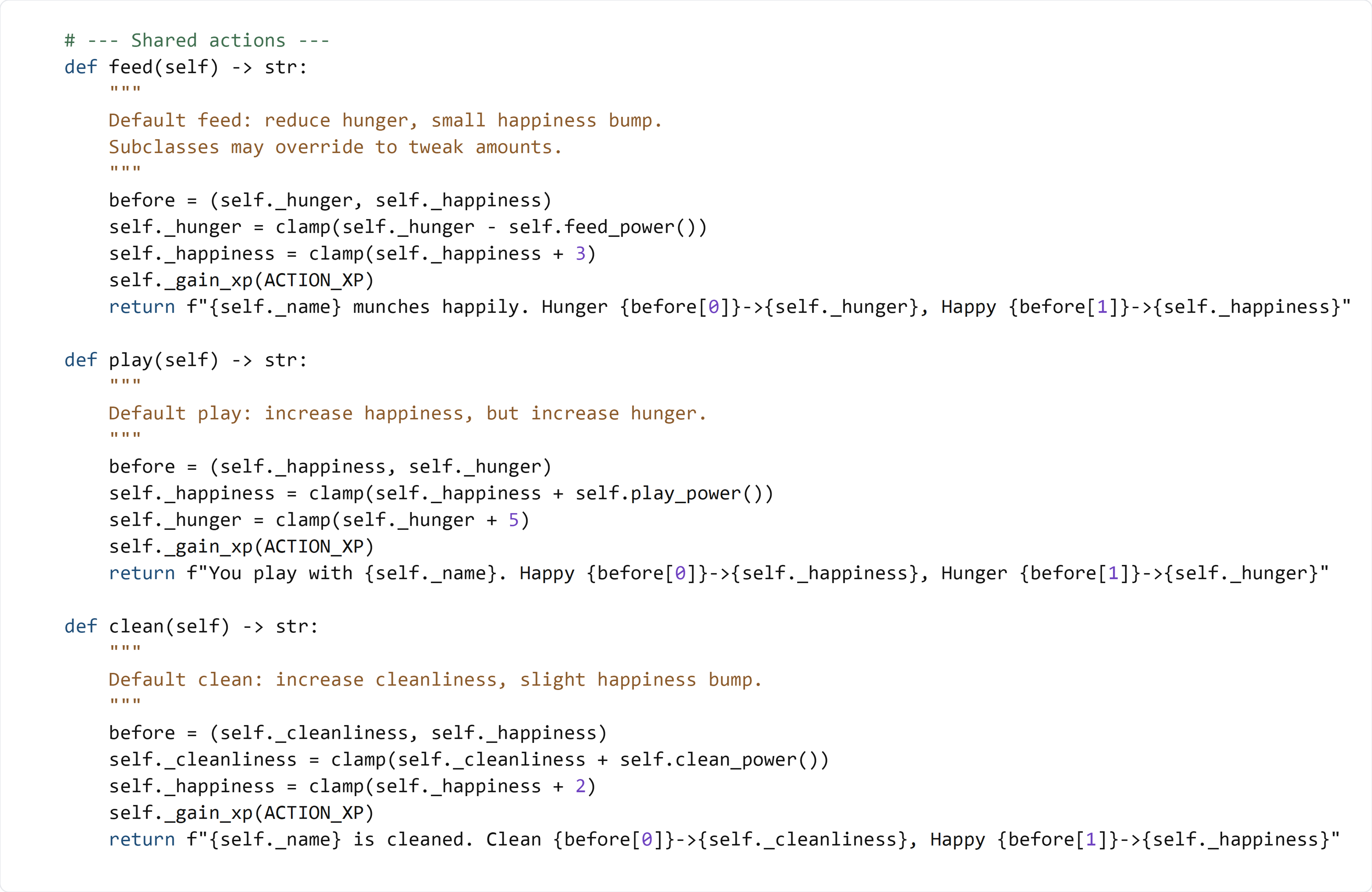
🧠 Code Review & Key Concepts (What important lines do)
The before = (...) tuple
before = (self._hunger, self._happiness)
This stores the "before" values so the message can show a before/after change like:
Hunger 45->25
Changing stats with clamp()
self._hunger = clamp(self._hunger - self.feed_power())
This line:
- subtracts an amount from hunger
- clamps the value so it stays between 0 and 100
Calling self._gain_xp(ACTION_XP)
self._gain_xp(ACTION_XP)
This rewards XP for taking an action.
If your code doesn't fully work yet after this section, that's okay:
- We are calling a method (
_gain_xp) that we will build in a later section.
Returning a message with an f-string
return f"{self._name} munches happily. Hunger {before[0]}->{self._hunger}, Happy {before[1]}->{self._happiness}"
This builds a string using an f-string:
{self._name}inserts the animal's name{before[0]}uses the old value we saved{self._hunger}uses the new value after the change
🧪 Test File: s4_test.py
✅ Create this file
Create a new file in the same folder as pet_manager.py called:
s4_test.py
💻 Code to write in s4_test.py
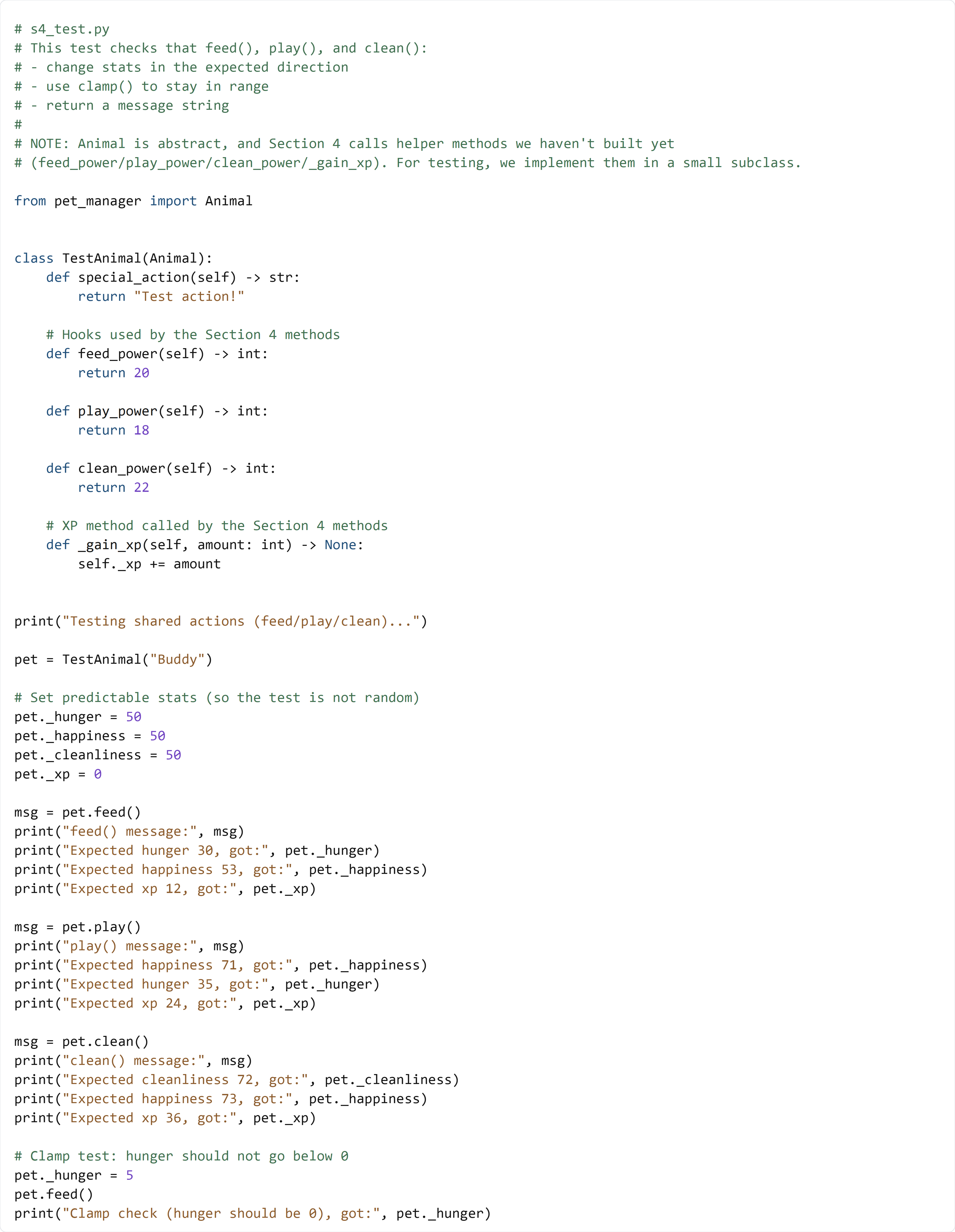
🧠 What this test is doing (and how it works)
Animalis abstract, so we createTestAnimalto implementspecial_action()- Section 4 calls
feed_power(),play_power(),clean_power(), and_gain_xp(): this test provides those methods so the new actions can run now - We set
_hunger,_happiness, and_cleanlinessto known values so the test is predictable - After each action, we print the expected value and the actual value
- The final check makes sure
clamp()stops hunger from going negative
✅ Run the test:
python s4_test.py
If your output matches the "Expected ... got ..." lines, your Section 4 code is working correctly.