⏳ Section 6: Tick + Leveling System
📝 Summary (What you will do)
In this section, you will add a time-passing system to your pets. You will:
- Create a
tick()method that runs each turn - Add private helper methods for stat decay
- Add XP and leveling logic so pets grow over time
This makes your game feel alive because stats change even when the player does nothing.
✅ Checklist (You must complete these)
- Open
pet_manager.py - Find
class Animal - Locate the override hooks (
feed_power,play_power,clean_power) - Right after those hooks, add the tick + leveling code shown below
- Type the code by hand so you understand how it works
✅ No new constants/settings are added in this section, so you do not need to edit the top-of-file constants.
🎓 Core Concepts (New learning for this section)
1) The game loop and tick()
Most games have a game loop that repeats and advances time.
In this project, each turn is one loop, and tick() is the method that:
- Moves time forward
- Applies stat decay
- Gives a small XP reward for surviving the turn
The main loop will call tick() after each turn so the pet changes even if you skip time.
2) Private helper methods
Methods that start with an underscore (like _decay_hunger) are private helpers.
That means:
- They are meant to be used inside the class
- Subclasses can still override them if needed
- They keep the main method (
tick) clean and readable
3) Leveling with a while loop
XP can sometimes jump by a lot. A while loop lets you level up more than once if you have enough XP.
Example idea:
- If a pet gains 100 XP in one action, it might level up twice
- The
whileloop keeps checking until XP is below the next level threshold
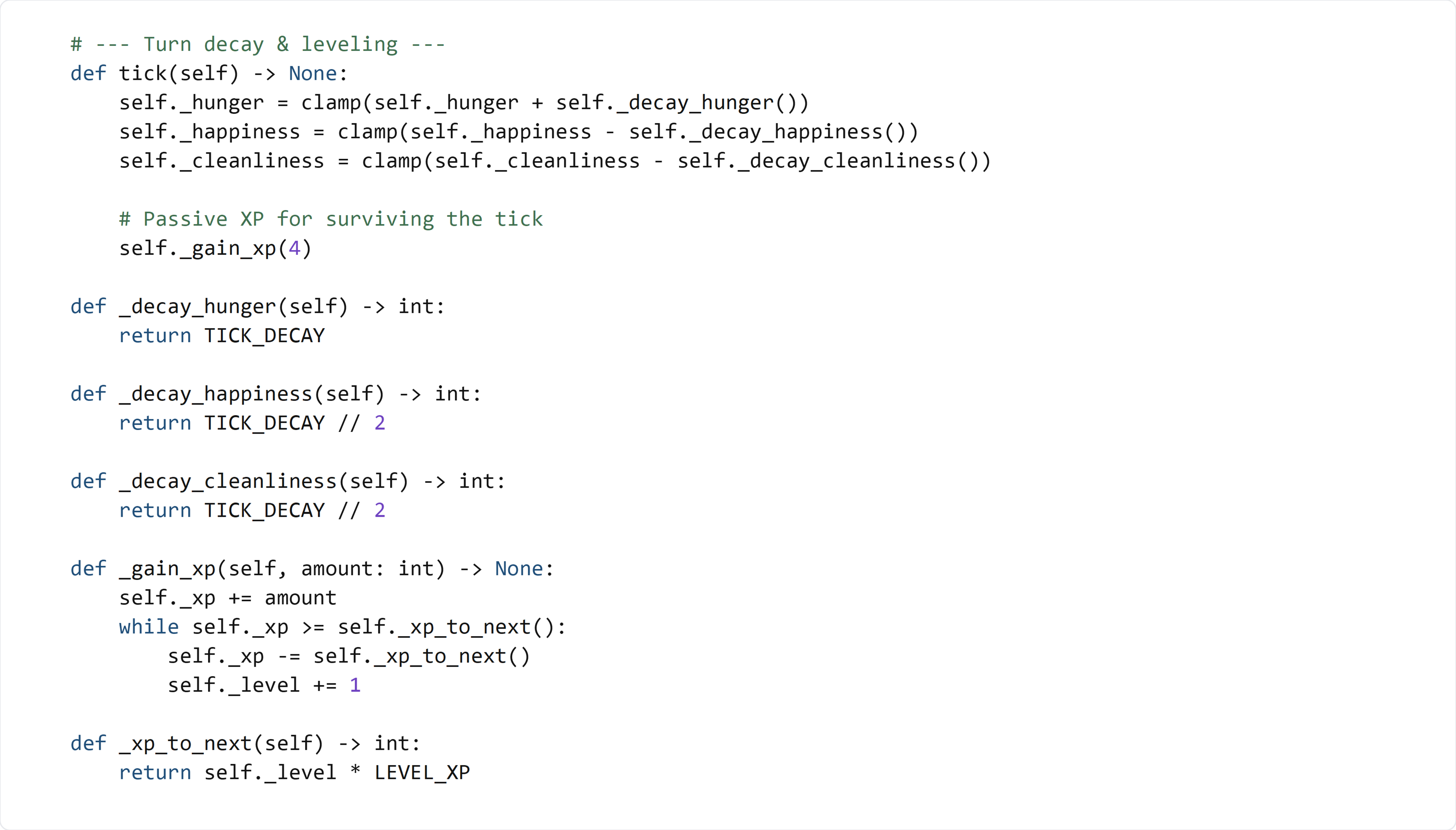
💻 Code to Write (Type this by hand in pet_manager.py)
Directions:
- Open
pet_manager.py - Find
class Animal - Scroll to the override hooks (
feed_power,play_power,clean_power) - Right after those methods, type the following code by hand:
🧠 Code Review & Key Concepts (What important lines do)
tick()
self._hunger = clamp(self._hunger + self._decay_hunger())
Hunger goes up each turn, so we add the decay value and clamp it to stay in range.
self._happiness = clamp(self._happiness - self._decay_happiness())
self._cleanliness = clamp(self._cleanliness - self._decay_cleanliness())
Happiness and cleanliness go down each turn, so we subtract the decay values.
self._gain_xp(4)
Pets gain a small amount of XP just for surviving the turn.
_decay_hunger, _decay_happiness, _decay_cleanliness
These helper methods return the decay values.
By using helpers, you can override them later in subclasses (like Dog or Bird) without changing tick().
_gain_xp() with a while loop
while self._xp >= self._xp_to_next():
This loop keeps leveling up as long as XP is enough for the next level.
That way, a large XP jump can trigger multiple levels.
_xp_to_next()
return self._level * LEVEL_XP
This makes the XP required to level up grow as the pet gets stronger.
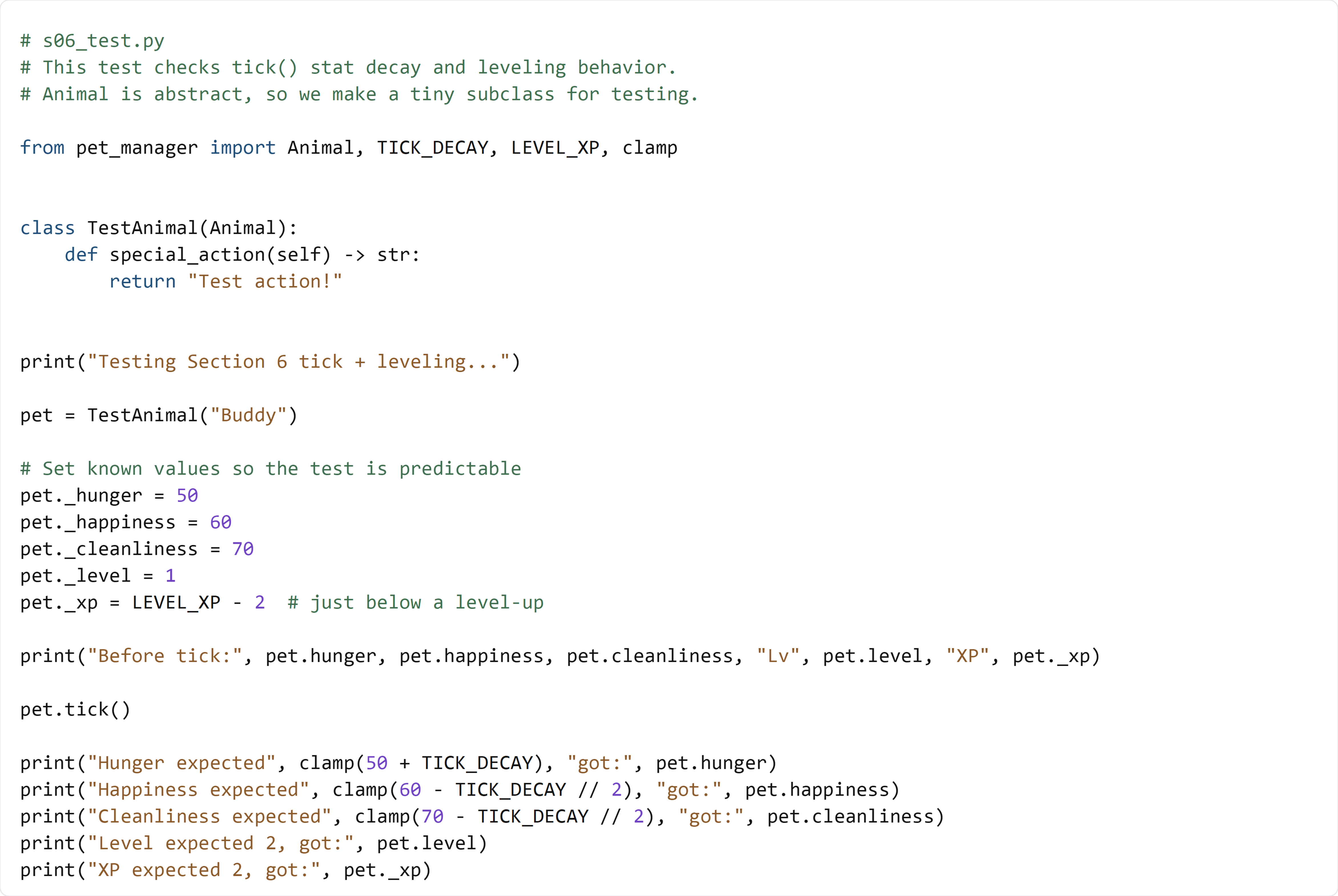
🧪 Test File: s06_test.py
✅ Create this file
Create a new file in the same folder as pet_manager.py called:
s06_test.py
💻 Code to write in s06_test.py
🧠 What this test is doing (and how it works)
- We create
TestAnimalso we can instantiate anAnimal - We manually set stats and XP so the results are predictable
tick()should increase hunger and decrease happiness/cleanliness- The +4 XP pushes the pet over the level-up threshold
- We print expected vs actual values to confirm the logic
✅ Run the test:
python s06_test.py
If the printed values match the expectations, your tick + leveling system works.