📊 Section 7: Add a Quick Stats Display Method
📝 Summary (What you will do)
In this section, you will create a clean, readable stats line for each pet. You will:
- Build a
short_stats()method that returns a formatted string - Use a tiny helper (
bar) to draw a simple stat bar - Practice string formatting so numbers line up neatly
This makes the terminal UI easy to scan during gameplay.
✅ Checklist (You must complete these)
- Open
pet_manager.py - Find
class Animal - Locate the leveling methods (
_gain_xp,_xp_to_next) - Right after those methods, add the UI helper shown below
- Type the code by hand so you understand how it works
✅ No new constants/settings are added in this section, so you do not need to edit the top-of-file constants.
🎓 Core Concepts (New learning for this section)
1) Formatting readable output
When a program prints values, the output should be easy to read quickly.
We use formatted strings (f"...") so we can:
- Insert values directly into the text
- Align numbers to the same width
- Combine words, numbers, and symbols in one clean line
2) Tiny helper functions
The bar helper is a small function that turns a number into a visual bar.
It keeps the main return statement readable by hiding the repeated math.
3) Representing “full” vs “empty” visually
We use two characters:
█for filled blocks·for empty blocks
This creates a quick progress bar for each stat so you can glance at a pet’s status without reading every number.
💻 Code to Write (Type this by hand in pet_manager.py)
Directions:
- Open
pet_manager.py - Find
class Animal - Scroll to the leveling methods (
_gain_xp,_xp_to_next) - Right after those methods, type the following code by hand:

🧠 Code Review & Key Concepts (What important lines do)
The bar helper
bar = lambda v: "█" * (v // 10) + "·" * (10 - v // 10)
This converts a stat into a 10-character bar:
- The number of
█blocks is based on the value - The remaining spaces are filled with
·dots
Aligned numbers
f"Hunger:{self._hunger:3d}"
The :3d makes the number always 3 characters wide, so the columns line up.
A single readable line
return (f"{self._name} (Lv {self._level}) | " ...
The method returns one clean line that includes name, level, and three stat bars.
This is what the dashboard will use to show each pet at a glance.
🧪 Test File: s07_test.py
✅ Create this file
Create a new file in the same folder as pet_manager.py called:
s07_test.py
💻 Code to write in s07_test.py
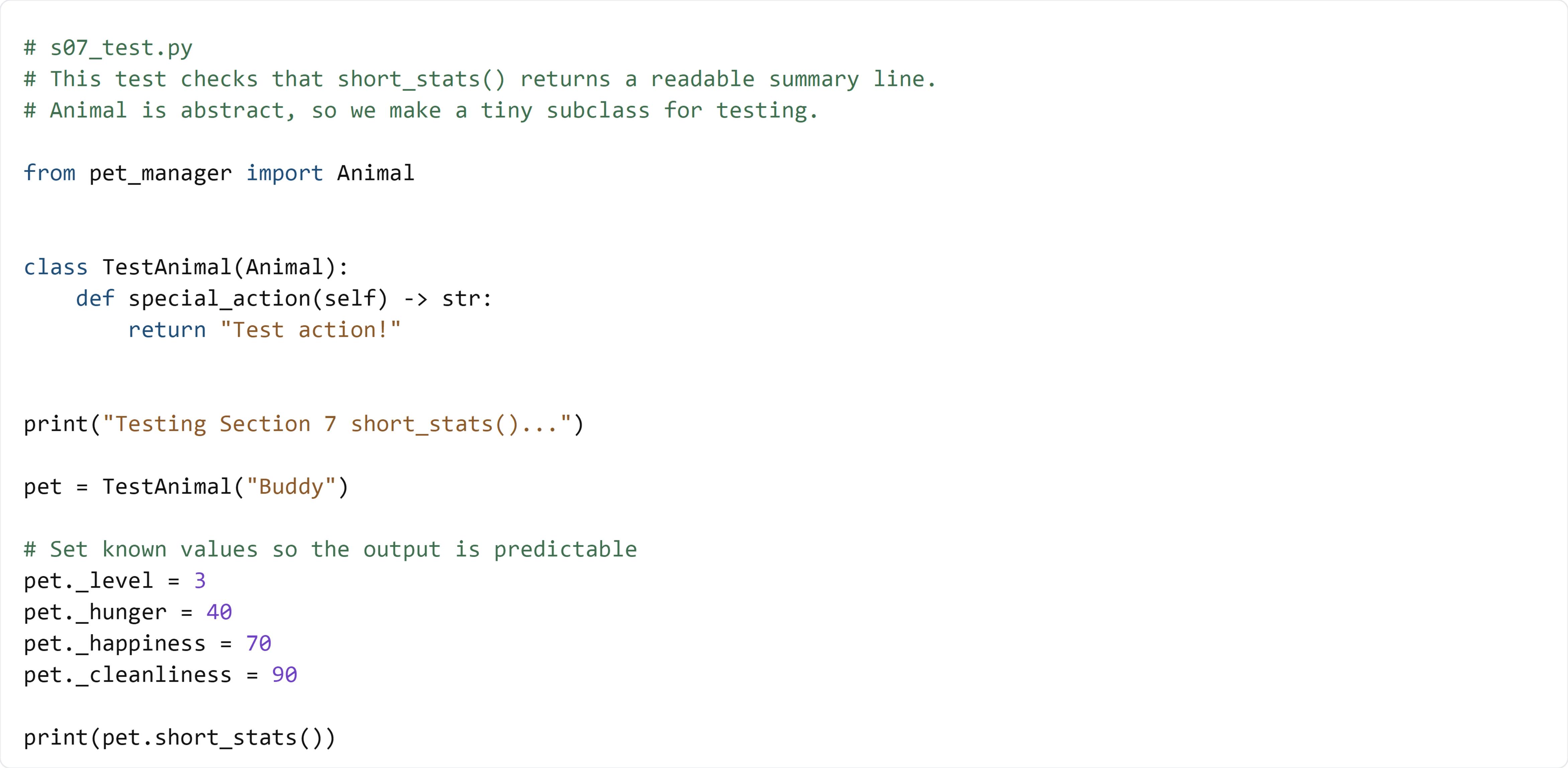
🧠 What this test is doing (and how it works)
- We create
TestAnimalso we can instantiate anAnimal - We set stats to known values so the output is predictable
- We call
short_stats()and print the result - You should see the pet name, level, and three bars in one line
✅ Run the test:
python s07_test.py
If the line looks clean and the bars match the stats, your UI helper works.