🧾 Section 9: Make the SPECIES Lookup Dictionary
📝 Summary (What you will do)
In this section, you will add a lookup dictionary that maps a species name to its class. You will:
- Create a
SPECIESdictionary below the animal classes - Store classes as dictionary values
- Make it easy for the program to create pets dynamically
This is how the game can choose a species by name and build the correct object.
✅ Checklist (You must complete these)
- Open
pet_manager.py - Scroll to just below the species classes (
Dog,Cat,Bird) - Add the
SPECIESdictionary shown below - Type the code by hand so you understand the pattern
✅ No new constants/settings are added in this section, so you do not need to edit the top-of-file constants.
🎓 Core Concepts (New learning for this section)
1) Dictionaries can store classes
A dictionary does not have to store only numbers or strings.
It can store classes too.
That means you can do:
- Look up a class by name (
SPECIES["Dog"]) - Create a new object with that class (
SPECIES["Dog"]("Buddy"))
2) Why this helps the program
Later, the user will choose a species by name.
The program can then look up the class and build the pet without using a long chain of if statements.
3) Type hints for class dictionaries
The type hint:
Dict[str, Type[Animal]]
means:
- Keys are strings (like
"Dog") - Values are classes that are subclasses of
Animal
This makes your code clearer and safer.
💻 Code to Write (Type this by hand in pet_manager.py)
Directions:
- Open
pet_manager.py - Find the species classes (
Dog,Cat,Bird) - Right below them, type the following code by hand:

🧠 Code Review & Key Concepts (What important lines do)
The SPECIES dictionary
SPECIES: Dict[str, Type[Animal]] = {
    "Dog": Dog,
    "Cat": Cat,
    "Bird": Bird,
}
- Each key is a string name the user can pick
- Each value is the class that will be used to create that pet
This lets the program dynamically create the right species with a single lookup.
🧪 Test File: s09_test.py
✅ Create this file
Create a new file in the same folder as pet_manager.py called:
s09_test.py
💻 Code to write in s09_test.py
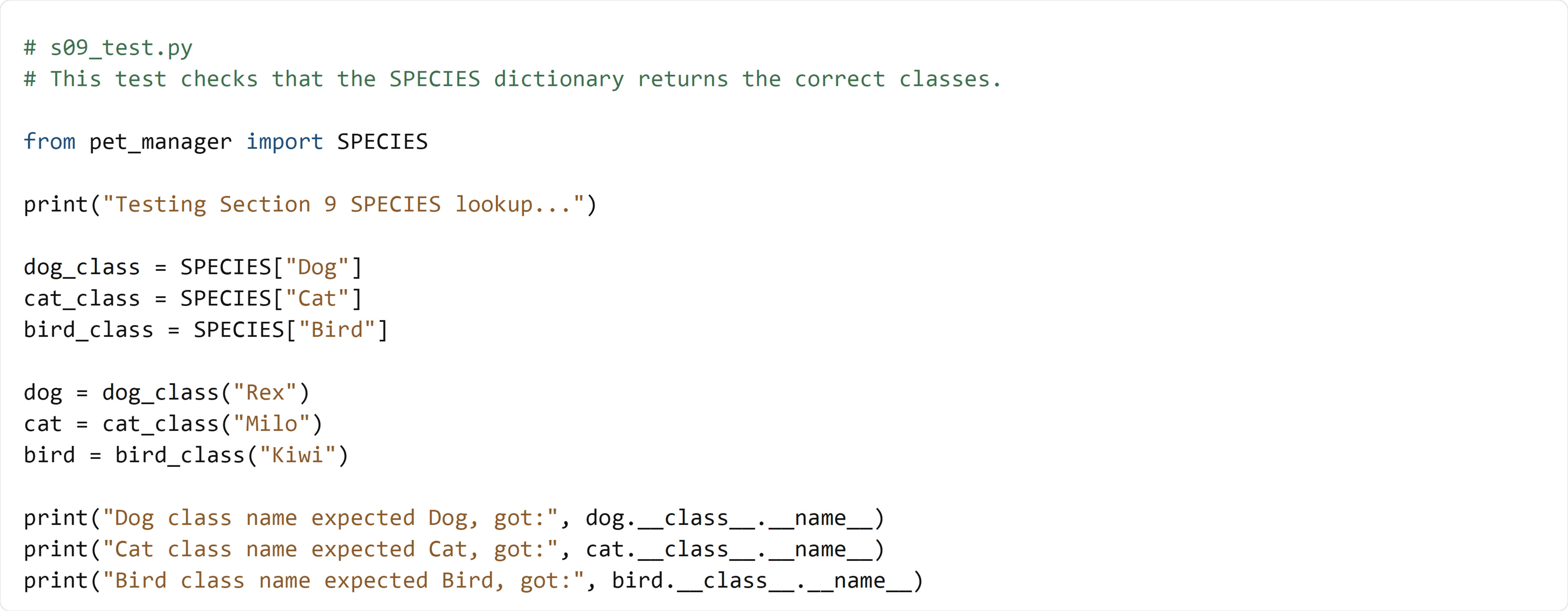
🧠 What this test is doing (and how it works)
- We pull each class from the
SPECIESdictionary by name - We create one instance of each class
- We print the class names to confirm the lookup worked
✅ Run the test:
python s09_test.py
If the class names match, your lookup dictionary is working correctly.