⏭️ Section 13: Time Passing (Tick System)
📝 Summary (What you will do)
In this section, you will add a time‑passing helper that advances every pet in the game. You will:
- Create a
tick_all()function that loops over all pets - Call each pet’s
tick()method so stats decay automatically
This keeps the game moving forward after every turn.
✅ Checklist (You must complete these)
- Open
pet_manager.py - Find the end of the flow functions (
adopt_flowandcare_flow) - Directly below them, add the
tick_all()function - Type the code by hand so you understand how the loop works
✅ No new constants/settings are added in this section, so you do not need to edit the top-of-file constants.
🎓 Core Concepts (New learning for this section)
1) Looping over a list of objects
player.animals is a list of Animal objects.
A for loop lets us run the same action on each pet:
- First pet gets a tick
- Second pet gets a tick
- Every pet advances time
2) Calling a method on each object
Each pet handles its own tick logic.
The loop doesn’t need to know the details — it just calls:
pet.tick()
That is object‑oriented design in action.
💻 Code to Write (Type this by hand in pet_manager.py)
Directions:
- Open
pet_manager.py - Find the end of the flow functions (
adopt_flow,care_flow) - Directly below them, type the following code by hand:

🧠 Code Review & Key Concepts (What important lines do)
The loop
for pet in player.animals:
This goes through each pet the player owns, one by one.
Calling tick()
pet.tick()
Each pet updates its own hunger, happiness, cleanliness, and XP.
🧪 Test File: s13_test.py
✅ Create this file
Create a new file in the same folder as pet_manager.py called:
s13_test.py
💻 Code to write in s13_test.py
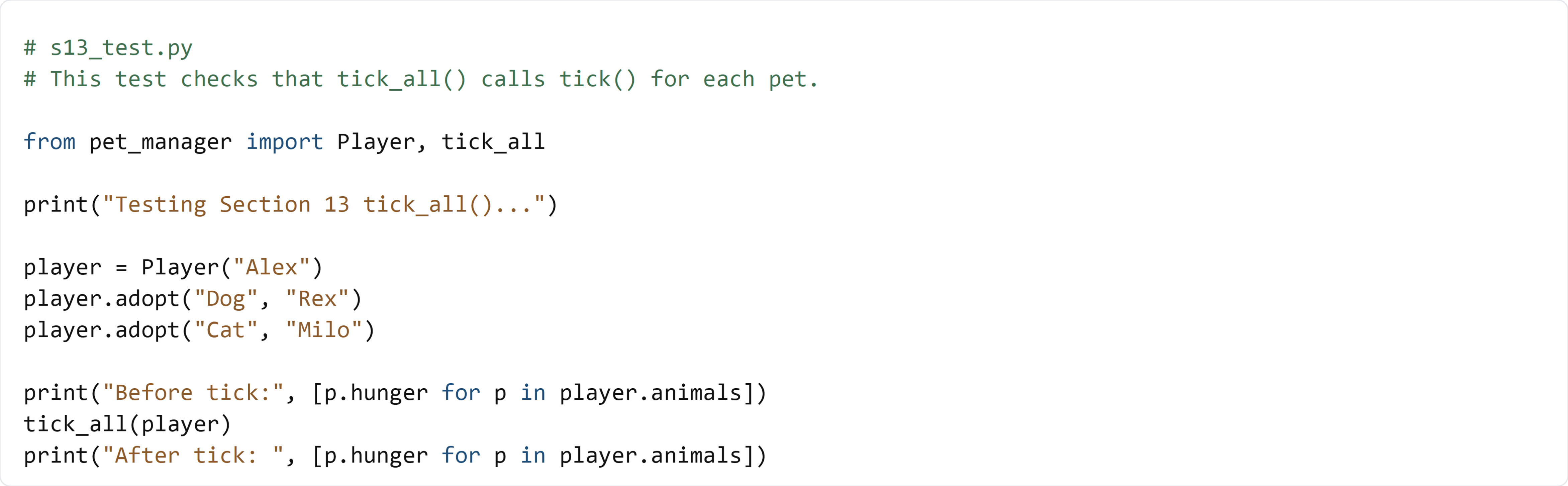
🧠 What this test is doing (and how it works)
- We create a
Playerwith two pets - We print hunger before the tick
- We call
tick_all()to advance time - We print hunger again and expect it to increase
✅ Run the test:
python s13_test.py
If the hunger numbers go up, your tick system is working.